Control plane
使用conduit install | kubectl apply -f -命令可将conduit安装到Kubernetes集群. kubectl apply应用文件或者标准输入的资源配置.
conduit install的man.
Output Kubernetes configs to install Conduit.

Usage:
  conduit install [flags]

Flags:
      --controller-replicas uint   replicas of the controller to deploy (default 1)
  -h, --help                       help for install
      --image-pull-policy string   Docker image pull policy (default "IfNotPresent")
      --prometheus-replicas uint   replicas of prometheus to deploy (default 1)
  -r, --registry string            Docker registry to pull images from (default "gcr.io/runconduit")
  -v, --version string             Conduit version to install (default "v0.1.0")
      --web-replicas uint          replicas of the web server to deploy (default 1)

Global Flags:
  -n, --conduit-namespace string   namespace in which Conduit is installed (default "conduit")
运行conduit install > conduit_install.yml将conduit的配置输出到文件.
包含了几部分:
- Namespace
- Controller
- Web
- Prometheus
Namespace
安装过程会先创建名为conduit的命名空间. 可在安装的时候通过-n指定.
Controller
对应Conduit的control plane
Controller部分包含了2个service和5个container.
Service
一个是api, 一个proxy-api. 分别映射名为http的8085和名为grpc的8086端口.
使用的selector是app: controller.
类型是ClusterIP
Deployment
5个容器, 都使用同样的labels: app: controller和conduit.io/plane: control.
同样的镜像gcr.io/runconduit/controller:v0.1.0
public-api
提供HTTP服务, 响应来自客户端的查询:
- 指标数据(metrics)
- Conduit各种版本信息, 如Go版本, Control plane 版本, 构建日期.
- 集群
Pod列表 (调用destination服务) Pod的详细信息 (调用tab服务)
暴露名为http的8085和admin-http的9995端口.
destination
为Proxy提供服务发现功能, 支持k8s的目标机制, 接收<service>.<namespace>.svc.cluster.local:<port>格式的请求, 返回地址集.
使用k8s api的EndpointsWatcher, 监控k8s集群所有的端点(endpoints)和服务(service), 从集群获取地址集和service:port的改动.
port缺省为80, namespace缺省为default.
暴露名为grpc的8089和admin-http的9999端口.
proxy-api
代理telemetry和tab服务, 将来自proxy的请求转发到相应的服务.
暴露名为grpc的8086和admin-http的9996端口.
tap
接收客户端的请求(Pod name或者Deployment name)返回完整信息的Pod数组.
暴露名为grpc的8088和admin-http的9998端口.
telemetry
遥测器.
- 接收客户端的请求, 通过k8s api获取集群的
Pod和ReplicaSet并返回. - 接收来自
Proxy的report请求, 将数据上报给Prometheus.
暴露名为grpc的8087和admin-http的9997端口.
Web
包含一个service和一个container
Service
暴露web服务, 分别映射名为http的8084和名为admin-http的9994端口.
使用的selector是app: web.
类型是ClusterIP
Deployment
使用label app: web和conduit.io/plane: control
镜像名为gcr.io/runconduit/web:v0.1.0
web
前后端分离, 前端为react应用. 后端会直接调用public-api的服务.
Prometheus
记录proxy通过telemetry上报的指标数据.
全局架构图
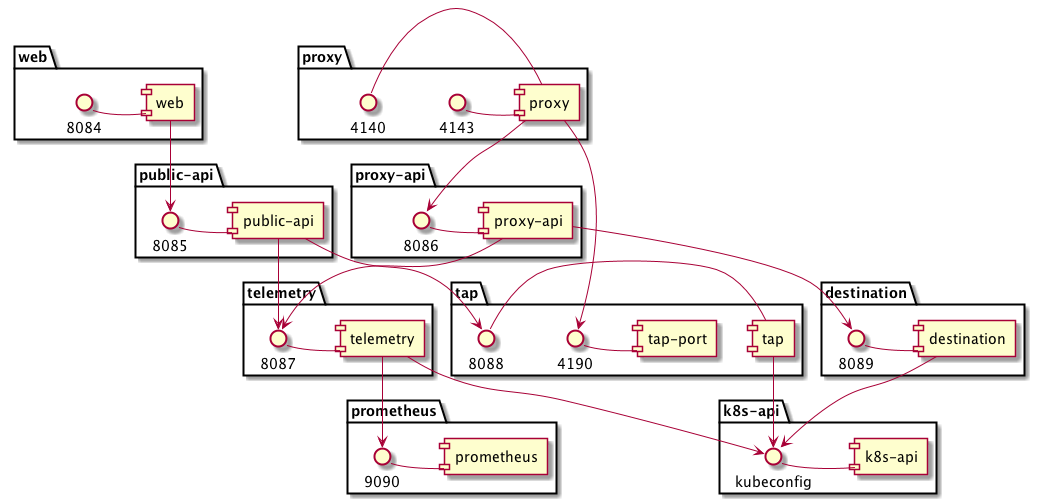
注: 下面是conduit install命令生成的配置.
### Namespace ###
kind: Namespace
apiVersion: v1
metadata:
  name: conduit

### Controller ###
---
kind: Service
apiVersion: v1
metadata:
  name: api
  namespace: conduit
  labels:
    app: controller
    conduit.io/plane: control
  annotations:
    conduit.io/created-by: "conduit/cli v0.1.0"
spec:
  type: ClusterIP
  selector:
    app: controller
  ports:
  - name: http
    port: 8085
    targetPort: 8085

---
kind: Service
apiVersion: v1
metadata:
  name: proxy-api
  namespace: conduit
  labels:
    app: controller
    conduit.io/plane: control
  annotations:
    conduit.io/created-by: "conduit/cli v0.1.0"
spec:
  type: ClusterIP
  selector:
    app: controller
  ports:
  - name: grpc
    port: 8086
    targetPort: 8086

---
kind: Deployment
apiVersion: extensions/v1beta1
metadata:
  name: controller
  namespace: conduit
  labels:
    app: controller
    conduit.io/plane: control
  annotations:
    conduit.io/created-by: "conduit/cli v0.1.0"
spec:
  replicas: 1
  template:
    metadata:
      labels:
        app: controller
        conduit.io/plane: control
      annotations:
        conduit.io/created-by: "conduit/cli v0.1.0"
    spec:
      containers:
      - name: public-api
        ports:
        - name: http
          containerPort: 8085
        - name: admin-http
          containerPort: 9995
        image: gcr.io/runconduit/controller:v0.1.0
        imagePullPolicy: IfNotPresent
        args:
        - "public-api"
        - "-addr=:8085"
        - "-metrics-addr=:9995"
        - "-telemetry-addr=127.0.0.1:8087"
        - "-tap-addr=127.0.0.1:8088"
      - name: destination
        ports:
        - name: grpc
          containerPort: 8089
        - name: admin-http
          containerPort: 9999
        image: gcr.io/runconduit/controller:v0.1.0
        imagePullPolicy: IfNotPresent
        args:
        - "destination"
        - "-addr=:8089"
        - "-metrics-addr=:9999"
      - name: proxy-api
        ports:
        - name: grpc
          containerPort: 8086
        - name: admin-http
          containerPort: 9996
        image: gcr.io/runconduit/controller:v0.1.0
        imagePullPolicy: IfNotPresent
        args:
        - "proxy-api"
        - "-addr=:8086"
        - "-metrics-addr=:9996"
        - "-destination-addr=:8089"
        - "-telemetry-addr=:8087"
      - name: tap
        ports:
        - name: grpc
          containerPort: 8088
        - name: admin-http
          containerPort: 9998
        image: gcr.io/runconduit/controller:v0.1.0
        imagePullPolicy: IfNotPresent
        args:
        - "tap"
        - "-addr=:8088"
        - "-metrics-addr=:9998"
      - name: telemetry
        ports:
        - name: grpc
          containerPort: 8087
        - name: admin-http
          containerPort: 9997
        image: gcr.io/runconduit/controller:v0.1.0
        imagePullPolicy: IfNotPresent
        args:
        - "telemetry"
        - "-addr=:8087"
        - "-metrics-addr=:9997"
        - "-ignore-namespaces=kube-system"
        - "-prometheus-url=http://prometheus:9090"

### Web ###
---
kind: Service
apiVersion: v1
metadata:
  name: web
  namespace: conduit
  labels:
    app: web
    conduit.io/plane: control
  annotations:
    conduit.io/created-by: "conduit/cli v0.1.0"
spec:
  type: ClusterIP
  selector:
    app: web
  ports:
  - name: http
    port: 8084
    targetPort: 8084
  - name: admin-http
    port: 9994
    targetPort: 9994

---
kind: Deployment
apiVersion: extensions/v1beta1
metadata:
  name: web
  namespace: conduit
  labels:
    app: web
    conduit.io/plane: control
  annotations:
    conduit.io/created-by: "conduit/cli v0.1.0"
spec:
  replicas: 1
  template:
    metadata:
      labels:
        app: web
        conduit.io/plane: control
      annotations:
        conduit.io/created-by: "conduit/cli v0.1.0"
    spec:
      containers:
      - name: web
        ports:
        - name: http
          containerPort: 8084
        - name: admin-http
          containerPort: 9994
        image: gcr.io/runconduit/web:v0.1.0
        imagePullPolicy: IfNotPresent
        args:
        - "-addr=:8084"
        - "-metrics-addr=:9994"
        - "-api-addr=api:8085"
        - "-static-dir=/dist"
        - "-template-dir=/templates"
        - "-uuid=96e84670-0a7c-4c08-8c13-2c2d988f992e"
        - "-namespace=conduit"

### Prometheus ###
---
kind: Service
apiVersion: v1
metadata:
  name: prometheus
  namespace: conduit
  labels:
    app: prometheus
    conduit.io/plane: control
  annotations:
    conduit.io/created-by: "conduit/cli v0.1.0"
spec:
  type: ClusterIP
  selector:
    app: prometheus
  ports:
  - name: http
    port: 9090
    targetPort: 9090

---
kind: Deployment
apiVersion: extensions/v1beta1
metadata:
  name: prometheus
  namespace: conduit
  labels:
    app: prometheus
    conduit.io/plane: control
  annotations:
    conduit.io/created-by: "conduit/cli v0.1.0"
spec:
  replicas: 1
  template:
    metadata:
      labels:
        app: prometheus
        conduit.io/plane: control
      annotations:
        conduit.io/created-by: "conduit/cli v0.1.0"
    spec:
      volumes:
      - name: prometheus-config
        configMap:
          name: prometheus-config
      containers:
      - name: prometheus
        ports:
        - name: http
          containerPort: 9090
        volumeMounts:
        - name: prometheus-config
          mountPath: /etc/prometheus
          readOnly: true
        image: prom/prometheus:v1.8.1
        imagePullPolicy: IfNotPresent
        args:
        - "-storage.local.retention=6h"
        - "-storage.local.memory-chunks=500000"
        - "-config.file=/etc/prometheus/prometheus.yml"

      # TODO remove/replace?
      - name: kubectl
        image: buoyantio/kubectl:v1.6.2
        args: ["proxy", "-p", "8001"]

---
kind: ConfigMap
apiVersion: v1
metadata:
  name: prometheus-config
  namespace: conduit
  labels:
    app: prometheus
    conduit.io/plane: control
  annotations:
    conduit.io/created-by: "conduit/cli v0.1.0"
data:
  prometheus.yml: |-
    global:
      scrape_interval: 10s
      evaluation_interval: 10s

    scrape_configs:
    - job_name: 'prometheus'
      static_configs:
      - targets: ['localhost:9090']

    - job_name: 'controller'
      kubernetes_sd_configs:
      - role: pod
        namespaces:
          names: ['conduit']
      relabel_configs:
      - source_labels: [__meta_kubernetes_pod_container_port_name]
        action: keep
        regex: ^admin-http$
      - source_labels: [__meta_kubernetes_pod_container_name]
        action: replace
        target_label: job